Three pillars. One tool.
Patient records, scheduling and biomechanical analysis: brought together in an interface built for the reality of a practice.
PILLAR 01 · PATIENT RECORDS & ASSESSMENTS
A patient record that is readable and modular.
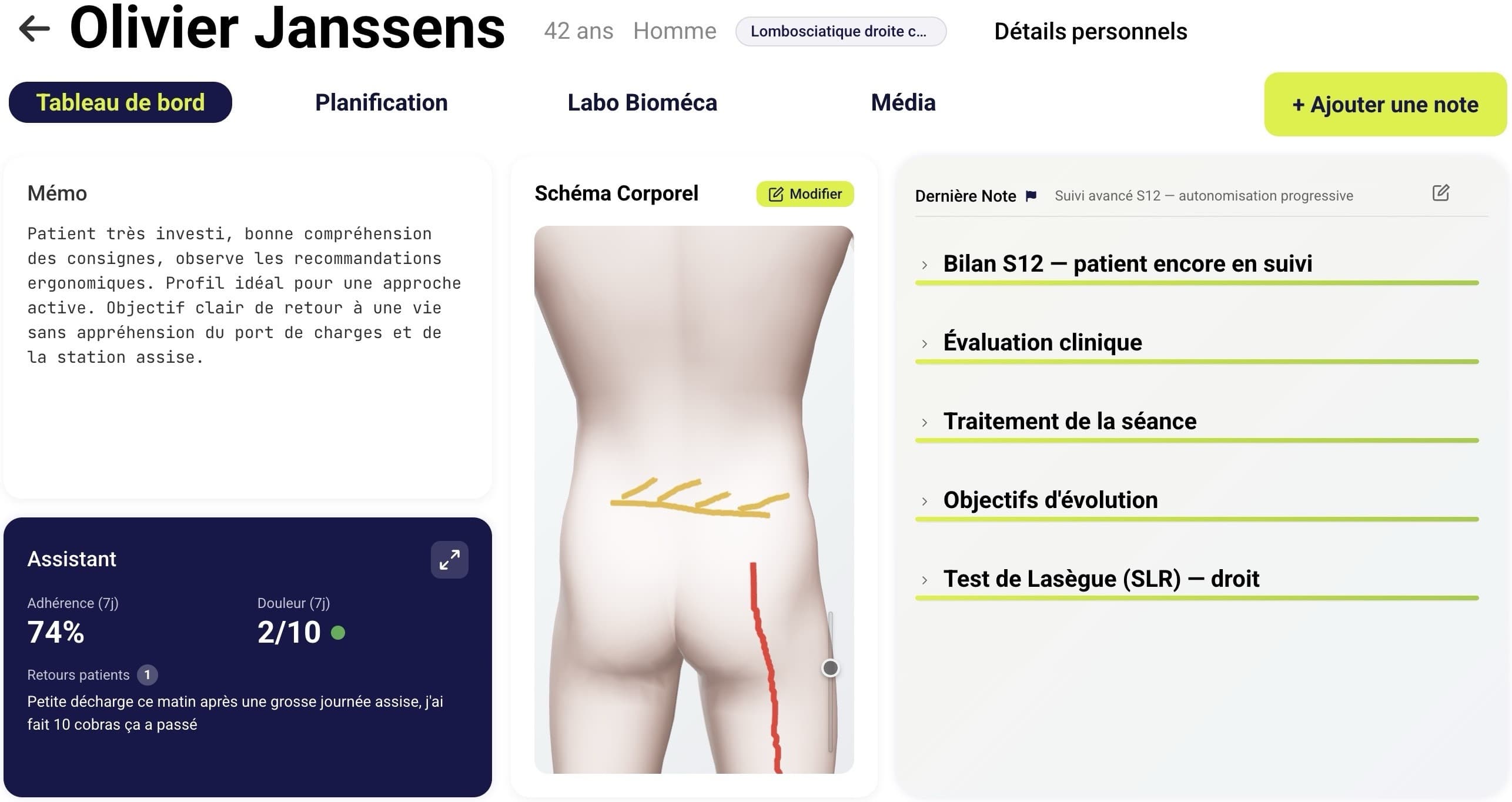
- Unified patient dashboard
Everything that matters in one view: history, pain, current exercises, last session, alerts.
- Modular assessment
Build your own assessment templates. Add, duplicate and reorder your sections.
- 3D body chart
Mark pain areas on a 3D model, shared between physio and patient, visible straight from the dashboard.
PILLAR 02 · PLANNING & FOLLOW-UP
A structured programme, a measured follow-up.
- Personalised exercise programmes
Assign exercise sets to a patient in two clicks, from your library, or by creating new ones.
- Adherence & pain in real time
Patients log the exercises they have done and how they felt, from their phone. You watch the curves move between sessions.
- Standard questionnaires built in
Oswestry, DASH, KOOS, PSFS and more, fill them in during the session or send them to the patient. Automatic scoring and progress curves.
PILLAR 03 · BIOMECHANICAL ANALYSIS
A biomechanics lab, with just a smartphone.
- 2D goniometer
Film the patient with a plain smartphone, with no markers, and get joint angles in a single plane. Like a goniometer, but digital.
- Progress tracking
Compare two measurements weeks apart. Show patients their progress with numbers, not just impressions.
Scheduling
The appointment feeds the record.
- Schedule and online booking
Your patients book and move their own appointments, with automatic email reminders.
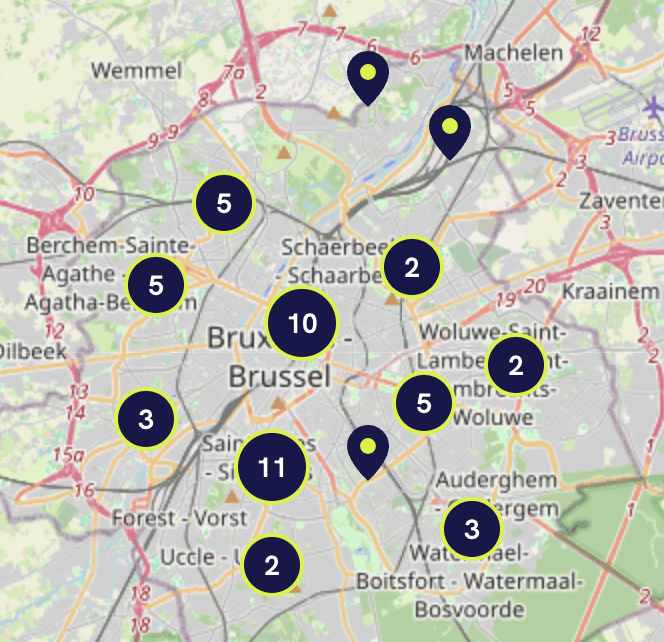
- The Synkro physio map
Every practitioner appears on a public map where patients find them and book a slot. The tool doesn't just save you time — it brings you patients.
- No double entry
The appointment and the session note live in the same tool, with no third-party software to keep in sync.
The exercise library
Film a movement, get an exercise.
- Your own library, filmed by you
Film the exercise with a smartphone, at the practice or anywhere else: a few seconds of video are enough to add it to your library and prescribe it to your patients.
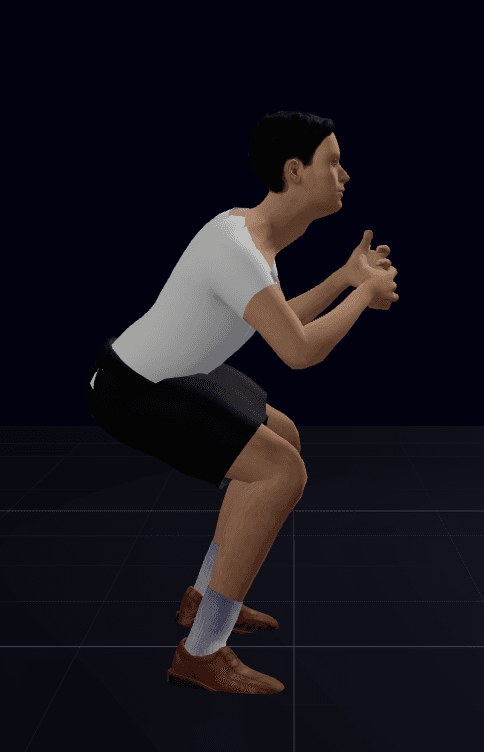
- An anonymised 3D avatar
The movement is reconstructed in all three planes and replayed by a neutral avatar: no image rights to manage, no re-shooting, and the patient can watch the movement from every angle.
- The same technology as the analysis
Synkro's markerless movement reconstruction engine captures the kinematics of the movement. Objects — weights, resistance bands — are not reconstructed: the movement is.
On every screen you use,
and in the patient’s hands.
One consistent experience, from the big screen at the practice to the patient’s phone.
WEB
Physio web app
The full interface at the practice: patient management, in-depth assessments, planning, biomechanics.
MOBILE & TABLET
Physio app
Synkro in your pocket: voice notes, photos, measurements, exercise validation, wherever you need it.
MOBILE & TABLET
Patient app
Exercise reminders, pain feedback, progress tracking. Patients stay engaged between sessions.
A platform that covers your whole practice.
Synkro is growing to bring together every tool a modern physiotherapy practice needs.
TODAY
Synkro Clinic
Modern clinical follow-up: patient records, assessments, exercises, schedule and online booking, movement analysis. Available today.
IN PROGRESS
Admin module · MyCareNet
Billing to Belgian health insurance funds, built in. Member Data is certified; eAgreement, eAttest and eFact are in development. All four services are targeted before the legal deadline of 1 January 2027.
GOAL
The whole practice in one tool
Clinical follow-up, administration and advanced biomechanics, without juggling software.
eID card reading
Synkro can read your patient’s electronic ID card and fill in their record automatically: national number, first name, last name, date of birth, sex and address. In seconds, with no risk of a typo.
01
Belgian eID software
Install the official Belgian government middleware, required to read the chip on ID cards.
Download from eid.belgium.be02
USB card reader
A standard smart-card reader is enough, any reader on the market works (€15–25).
03
Synkro eID Bridge
Our small app to leave running in the background. It links the reader to Synkro, without sending any data outside your machine.
Synkro eID Bridge must stay open in the background during your consultation for card reading to work. It uses almost no resources and sends no data outside your machine.
The full eID reader guideYour eHealth certificate
The eHealth certificate lets Synkro use MyCareNet on your behalf, for example to check your patients’ health insurance. You create it once, with your identity card, using eHealth’s official program, which we have made ready to open.
01
Identity card and reader
The Belgian eID software and a card reader: the same as for card reading.
Download from eid.belgium.be02
Synkro – Certificat eHealth
eHealth’s official program, Java included: nothing else to install, no technical steps.
03
Upload it to Synkro
In Settings › eHealth certificate: the file you created and its password. That’s all.
Already have an eHealth certificate for your current software? Keep it and upload that same file to Synkro: no need to create a second one.
The full eHealth certificate guideTry it with your own patients.
15 days to make up your mind, no credit card. We can also walk you through it live, on a real case.
No commitment · Your data stays exportable